Stack your vocals in seconds. Then take them apart by hand.
What Vocal Mangler does
Drop your takes in. Pick the one you love. Everything else lines up to it.
Vocal Mangler listens to your takes the way you do — the frequency content, the
loudness, the timbre, the shape of the waveform, where the words start and how
the pitch moves — finds the same word in every take, and puts it where the lead
has it. Not by chopping the file into a grid. By moving each word only as far as
it has to go, and stretching only when moving isn’t enough.
The result is a stack that sounds like people singing together, because that’s
all it is: your own takes, mostly untouched, in the right place.
It moves before it cuts. Aligning a word is free — you’re just placing it.
Stretching it costs something. So Vocal Mangler always moves first, and only
stretches the part of the difference that a move can’t fix.
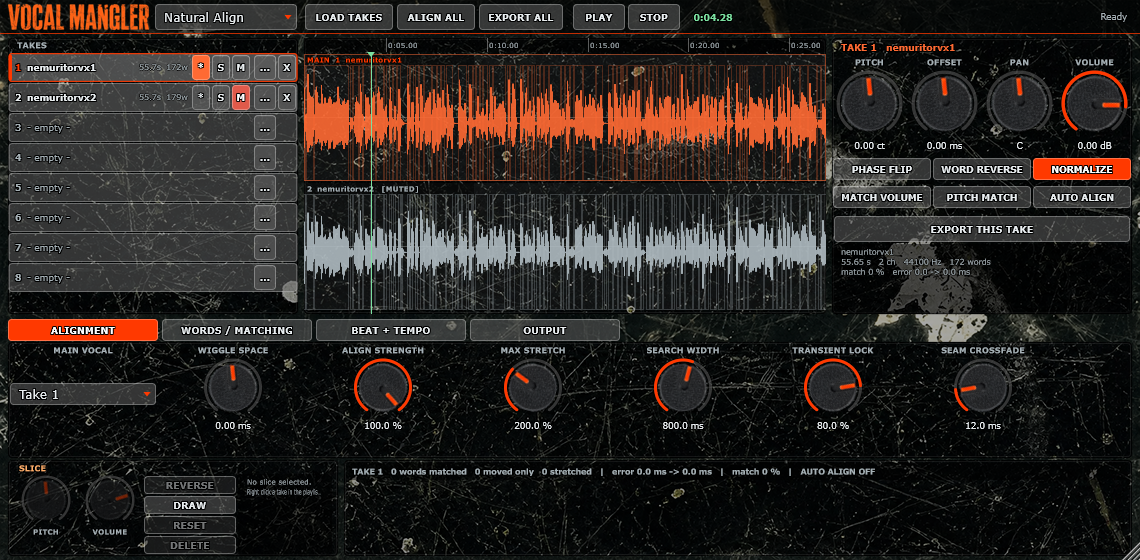
Wiggle Space — the knob that keeps the feel. Set it to 0 ms and every word
lands exactly on the lead. Set it to +90 ms and any word already sitting up to
90 ms behind is left completely alone — not processed, not touched, not
re-rendered — because that’s the pocket you sang. Negative values do the same for
takes that push ahead of the beat. This one control is the difference between a
stack that’s tight and a stack that’s stiff.
Stretching goes where you can’t hear it. When time really has to change, the
engine puts the change into silences and sustained vowels, and locks consonants
and attacks so they keep their shape. No smeared “t”s, no rubbery vowels.
No clicks. Ever. Joins are found by waveform similarity, not by chopping on a
grid, and every exposed edge gets an automatic micro-fade. Two takes are never
pulled into phase with each other, so a stack never comb-filters into a flanger.
When nothing needs doing, nothing is done. A word that already fits is copied
sample for sample. Verified, not claimed.
The manual half
Once it’s aligned, the playlist is yours. Every take is a lane on one timeline.
Cut right-click anywhere on a take. Cutting alone changes nothing — the halves still play as one sound until you move one
Move drag a slice. Ctrl+click to grab several — across different takes — and they all travel together
Stretch grab a slice’s edge (the cursor becomes two arrows) and pull. That slice only, pitch unchanged
Crossfade grab a top corner (the cursor becomes a pinching hand) and pull down
Volume draw switch on DRAW, and the cursor becomes a crayon — draw where the audio should peak and the waveform redraws under your hand
Per-slice pitch & volume independent of the take’s own knobs
Reverse / Reset / Delete on any slice, or on everything you’ve selected
Double-click to move the play position, space bar to play and stop. It is a
scratchpad for vocal chops, stutters, reverses and throws — sitting on top of an
aligner that already did the boring part.
Everything in the box
Alignment
- Up to 8 takes, one nominated as the Main Vocal
- Automatic word and syllable detection with adjustable sensitivity
- Wiggle Space (±1000 ms), Align Strength, Max Stretch, Transient Lock
- Per-word report: how far every word was out, where it ended up, what was
stretched, and a match score
Matching
- Pitch Match — each word onto the pitch of the matching lead word, with a
Contour Follow control so it can keep its own vibrato and inflection - Volume Match — word by word, not just overall, against the lead or a fixed
level, with a limit so one shouted word can’t be dragged into the noise floor - Normalize to a target peak
Per take
- Pitch (±48000 cents, time-preserving), Offset (±10 s), Pan (dead-centre
neutral), Volume, Phase Flip - Word Reverse — flips the audio inside each word and leaves the words in
their original order - Solo, Mute, and independent Export
Beat and tempo
- Align to the Main Vocal, to a beat file (it finds the tempo and the beats
for you), to a typed BPM, or to your host tempo - Quantize to any grid from 1/1 to 1/32 including triplets, with an amount
control — and quantizing only ever moves words, never stretches them
Manual editing
- Unlimited slices per take: cut, move, multi-select, stretch, crossfade,
reverse, per-slice pitch and volume, drawn volume shapes
Output
- Export each take, all takes at once, or the whole stack as one file (24-bit wav)
- What you export is exactly what you hear
- Input passthrough so you can hear the beat you’re working to
- Zero latency reported — nothing shifts in your project