Format: VST3, CLAP · Category: Spectral FX
Paint your sound. Hear the picture.
What it is
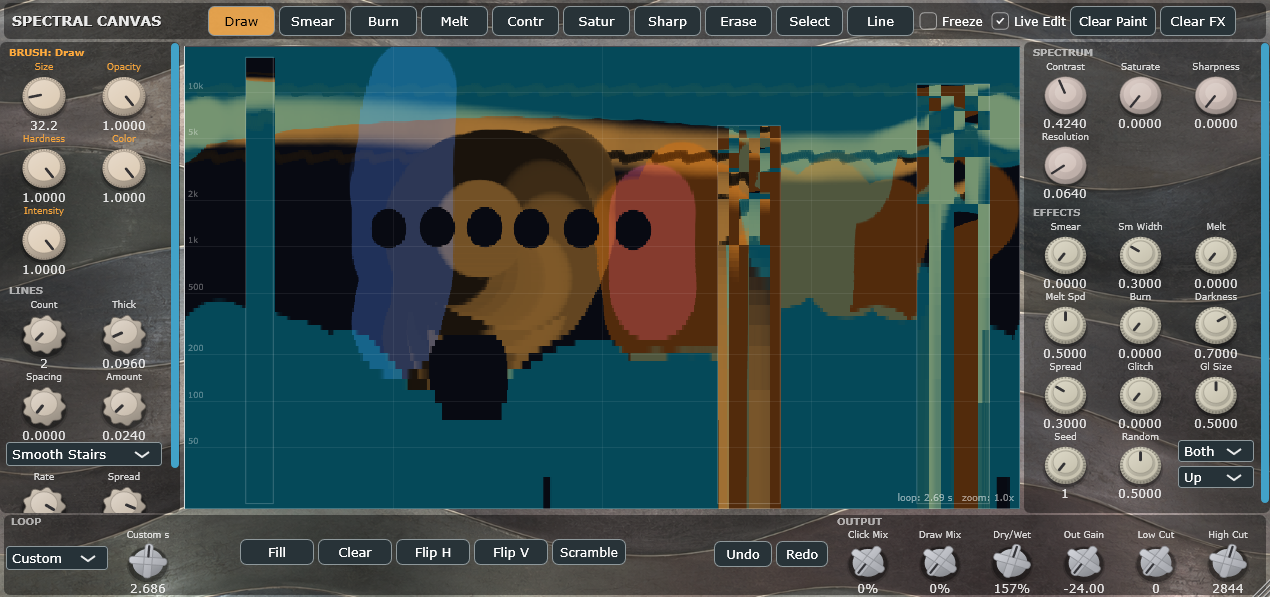
Spectral Canvas turns whatever you feed it into a living image of its own frequencies — and then lets you edit that image with brushes, like a paint program. Draw a stroke across the top of the canvas and you hear a bright streak appear in your audio. Burn a hole through the middle and the mids vanish. Smear the highs and they blur into each other. Every visual change is a real audio change, in real time.
Most spectral tools ask you to imagine what a frequency-domain edit will sound like. This one shows you the picture and puts a brush in your hand.
How it works, in plain terms
Audio comes in and is drawn as a scrolling spectrogram: time across, frequency up, brightness = loudness. That picture is a canvas you can paint on. Whatever you paint is converted straight back into sound — and it lives in a loop that rides along with your song, so a shape you draw over one bar keeps happening on that bar, pass after pass, locked to your tempo. Paint white and you’re adding sound. Paint black and you’re removing it. Nothing you draw is a preset or a static filter: it’s your own gesture, repeating in time.
Features
A real painting toolkit
Nine brushes: Draw, Smear, Burn, Melt, Contrast, Saturate, Sharpen, Erase, Select — each with its own size, opacity, hardness, color and intensity, independent from the global controls
Line mode works with any brush: click and it lays a geometric line — sine, square, triangle, stairs, smooth stairs, pulse, curve, double curve — across the whole loop, in that brush’s character. Burnt lines, melted lines, sharpened lines, erased lines. Stack up to 100 at once with spacing and phase spread
Live Edit: keep reshaping the stroke you just drew with the knobs after it’s down — thickness, color, shape, rate — so you’re never sculpting blind. Start the next stroke and the previous one locks in
Full Undo/Redo for strokes, canvas operations and knob moves
Spectral processing that behaves like an image editor
Contrast, Saturation, Sharpness, Resolution — push Resolution down and the spectrum genuinely pixelates into crunchy lo-fi artifacts
Smear (across time, frequency or both), Melt (with flow direction and speed), Burn (darkness and spread), Glitch Scramble (size, seed, randomness)
Region editing: draw a rectangle and tweak any spectrum or effect knob only inside it — everything outside stays exactly as you set it. Click away and your edit is baked in permanently while the knobs snap back, ready for the next region. Stack as many as you like
Selection tools: Fill, Clear, Flip horizontally/vertically, Scramble
Output stage
Clicking Mix — a character control that blends between the smooth engine and a harder, phase-aligned synthesis with real bite. Two distinct personalities on one knob
Drawing Mix — fade out everything you haven’t drawn on, up to hearing only your own painted content
Dry/Wet up to 500% for exaggerated, larger-than-life processing, plus output gain and spectral low/high cut
Built for actual sessions
Every knob is a host parameter — 39 of them, all browsable and automatable, brushes included. Right-click any knob for reset, copy/paste value, and your host’s own automation menu
Loop lengths sync to tempo (1/8 bar → 4 bars) or run on a free custom timer, with rock-solid looping that never skips
Silence in, silence out: your drawings only speak when audio is actually passing through
Resizable interface with a scrolling canvas, zoom and scroll on the frequency axis, and everything saved with your project
Light on CPU when idle, three plugin formats, no dongle, no phone-home
Why you’ll want it
Because it collapses the distance between an idea and a sound. A riser is a stroke upward. A telephone vocal is two black rectangles. A collapsing pad is the Melt brush dragged downward. A stuttering, bit-crushed breakdown is one Resolution knob and a Scramble. You are not tweaking twelve parameters hoping to arrive at a texture — you are drawing the texture and hearing it immediately, and everything is reversible until you decide it isn’t.
It rewards happy accidents as much as precision. Use it for one-shot sound design, for tempo-locked spectral loops that evolve under a whole arrangement, for surgical repair of a single harmonic, or for turning a boring loop into something nobody’s heard before. If you’ve ever wished you could just point at the part of a sound you want to change — that’s the plugin.