Dr. Ben Dova data bending vst3 plugin (distortion glitch)
Format: VST3, CLAP · Category: Distortion FX
A powerful plugin that simulates data bending in real time.
Inspired by data bending different audio file formats in HxD, this plugin has modes such as .waw, .flac, .mp3, .mp2, .mp1 and many more; each of them providing a different sound, perfect for people looking for unique glitchy and distorted effects that can spice up their production.
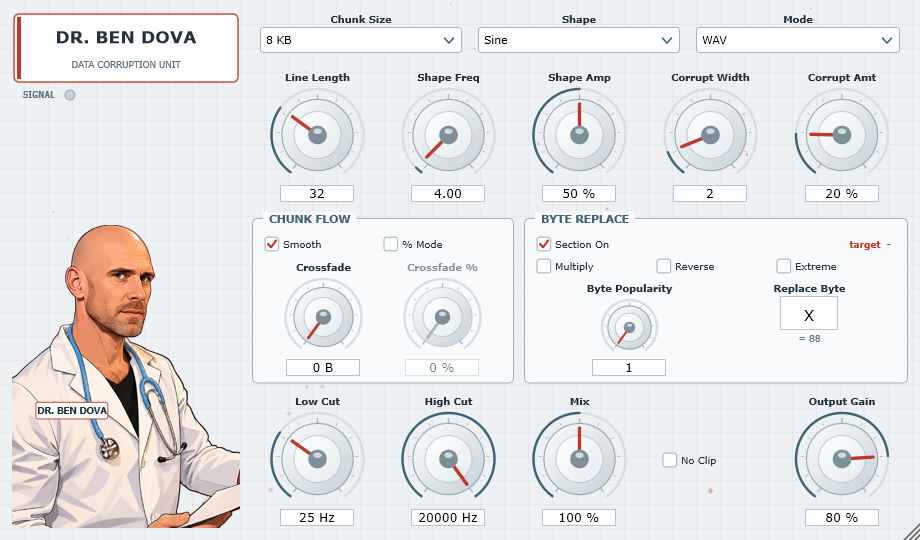
By choosing the byte chunk and line length you create a 2D matrix of raw data that you can then corrupt by choosing a shape that will run vertically through the chunk and corrupt all the data it touches.
You can adjust the proprieties of the shape such as frequency, amplitude and width by using the knobs below and the intensity of the corruption with the Corrupt amt knob.
You can play around in the chunk flow window and activate smooth mode if you want the shape of distortion to run seamlessly trough the following chunk and adjust the crossfade knobs that can cover up to 10 chunks to create a droney ambient sound.
If you want another layer of corruption you can play around in the Byte Replace section where you can input your own character and see how the sound changes as parts of the raw data are replaced with it.
Finally you have a low cut and high cut knob to adjust the sound to your liking, a mix knob that goes up to 500% if you really want to drive up the noise, a output gain knob and a no clipping option.
Automation can be used on all the knobs to create unique effects.
Full description of controls:
CHUNK SIZE 1 / 4 / 8 / 16 / 32 / 64 KB
Size of the virtual file. Small chunks re-draw the
corruption path often (fast, rhythmic glitching); large
chunks give long slow sweeps.
LINE LENGTH 1 – 100 bytes
Width of the byte grid. Short lines mean the path
covers a larger fraction of the data, so the effect is
denser.
SHAPE the figure the corruption path draws down the grid
           Sine           smooth left-right sweep
           Square         hard alternation between two columns
           Triangle       linear sweep, sharp turns
           Random         a new column every line
           Saw Up         ramp right, snap back
           Saw Down       ramp left, snap back
           Pulse          brief stab right, long stay left
           Sample & Hold  one random column held per cycle
           Smooth Noise   random columns, interpolated
           Stairs         eight discrete steps per cycle
           Bounce         rectified sine, ball-bouncing motion
           Chaos          logistic map, deterministic but wild
           Spiral         sine whose swing grows over four cycles
           Beat           two detuned sines, slow interference
           Sweep          sine whose rate keeps sliding
           Zigzag         triangle with a randomised peak position
           Brownian       reflecting random walk
           Comb           alternates sides on every single line
           Mirror         two symmetric paths, a double helix
           Flood          the whole line, every line
SHAPE FREQ 1 – 100 cycles down one chunk
SHAPE AMP 0 – 100 % of the line width (0 pins the path to the
middle column, 100 sweeps edge to edge)
CORRUPT WIDTH 1 – 10 bytes thick
CORRUPT AMT 1 – 100 %, how hard the touched bytes are mangled
MODE the file format the audio is pretended to be. The
encoding, the quantiser and the framing all change, so
corruption bites differently in each one.
           WAV                8-bit unsigned - the classic
           FLAC               8-bit + delta residual
           MP3                4-bit crush
           MP2                384-byte frames, repeated
           MP1                2-bit crush with bias
           WAV 16-bit         two bytes per sample
           WAV 24-bit         three bytes per sample
           WAV 32-bit float   four bytes - the most violent
           AIFF               16-bit BIG endian
           CD Audio           16-bit in 2352-byte sectors
           RAW PCM            signed 8-bit, headerless
           ALAC               16-bit + delta residual
           WavPack            16-bit + 2nd order, 4 KB blocks
           APE                16-bit + 3rd order residual
           AAC                5-bit with spectral holes
           OGG Vorbis         block switching, short/long windows
           Opus               20 ms frames, frame duplication
           WMA                scrambled with a rolling key
           AMR                160-byte frames, very coarse
           GSM 6.10           33-byte frames, telephone grade
           Speex              20-byte frames
           u-law              G.711 companding
           A-law              G.711 companding
           IMA ADPCM          adaptive delta - runaway screech
           MS ADPCM           adaptive delta with framing
           DSD                8x oversampled 1-bit sigma-delta

           A note on the lossless ones: with Corrupt Amt at its
           minimum they are transparent.  The lossy ones colour
           the sound even when nothing is being corrupted - that
           is the point of choosing them.

           Multi-byte modes (WAV 16/24/32, AIFF, CD, ALAC,
           WavPack, APE) put 2-4 bytes in the grid per sample, so
           the path hits high bytes and low bytes at different
           points - that is where the authentic torn-file sound
           comes from.
BYTE REPLACE (independent section, can be switched off)
SECTION ON enables the whole section
BYTE POPULARITY 1 – 100
Ranks every byte value that occurs in the chunk by how
often it occurs. At 1 that is the most common value,
at 2 the second most common, and so on.
MULTIPLY off: only the Nth ranked value is replaced
on: every value from rank 1 to rank N is replaced
REVERSE counts from the rarest value instead of the commonest
EXTREME stretches the knob across every distinct value present
in the chunk instead of stopping at 100, so at 100 %
with Multiply on the whole grid becomes one symbol
REPLACE BYTE the symbol written in. Type a character, or a number
0-255, or 0xNN for a raw byte value.
target read-out
shows the byte value currently being hunted, live
CHUNK FLOW
SMOOTH on: the corruption path keeps its phase across chunk
boundaries, so the figure is continuous and there
is no seam click
off: the path restarts at the top of every chunk
% MODE switches the crossfade knob between bytes and percent
CROSSFADE 0 – 1024 bytes. Blends the head of each chunk with the
tail of the previous one. Not needed for click removal
(Smooth handles that) – it is a texture, a smear across
the seam.
CROSSFADE % 0 – 1000 %. A feedback smear whose memory spans up to
ten chunks. This is the drone control: at 1000 % about
ten chunks of corrupted history are stacked on top of
each other.
OUTPUT
LOW CUT 10 Hz – 2 kHz on the wet path. Also removes the DC
offset that byte corruption produces, so leave it on.
HIGH CUT 200 Hz – 20 kHz on the wet path.
MIX 0 – 500 %. 0 is the untouched dry signal, 100 % is
pure wet with no dry left at all, above 100 % the wet
signal is driven up to five times.
NO CLIP off: the output is limited to +/-1
on: the limiter is removed and it clips out freely
OUTPUT GAIN 0 – 100 % (100 % is unity)